 Buy UK Sim Cards









Azumi Phone Unlock Code by IMEI – Code by Email
£1.99
Unlock code for 13 AZUMI models. Pick your model, add the 15-digit IMEI (*#06# shows it) and the code arrives in your inbox. £1.99 per phone. If we can’t make a code, you get a full refund.
- Satisfaction Guaranteed
- No Returns Accepted
- Secure Payments
How your credit is added
- 1Mobile data offSwitch off mobile data on your phone first.
- 2Insert the SIMWait a few seconds for the network signal.
- 3Message usSend us your order number on WhatsApp or Telegram.
- 4We add the creditWe top up the SIM remotely and you are ready to go.
Description
Code sent by email. If no code can be made for your Android phone, you get a full refund.
Azumi phones are budget friendly, and an unlock code keeps them that way: you can move to any network’s SIM without buying a new handset. We cover 13 Azumi models, from simple phones like the K242 to smartphones like the A4 Go and V4. Pick yours, add the IMEI and we email the code.
How to order your Azumi unlock code
- Choose your model. Pick it from the list above the basket button.
- Enter the IMEI. Key in *#06# and a 15-digit number appears. It is also printed on the device label.
- Pay and check your email. Your code goes to the email you use when paying, so check the spelling.
Unlocking more than one Android phone? Raise the quantity and a new IMEI box appears for each one.
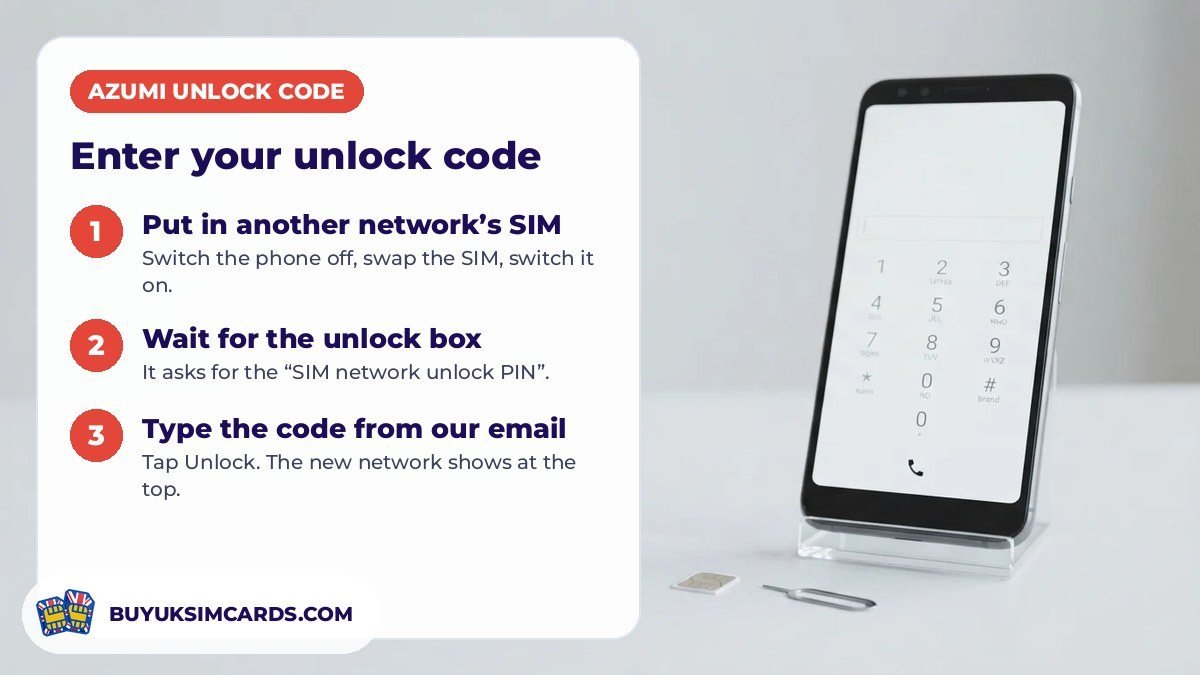
How to enter the unlock code on your Azumi Android phone
An Azumi phone with another network’s SIM inside shows a box such as “SIM network unlock PIN” or “Enter network code”.
- Use a SIM from another network. Switch off, swap the SIM, then switch the phone on again.
- Wait for the unlock box. Smartphones show “SIM network unlock PIN”. Keypad models show “Enter network code”.
- Type the code and confirm. Enter the code from our email and tap Unlock, or press OK on a keypad model. The new network appears.
Before you order
- Look for the exact model name in the phone’s settings under “About phone”, or on the label under the battery. “A4” and “A4 Go” are different models.
- If the phone never shows an unlock box with a new SIM, it may already be unlocked.
- Match the model name exactly. Each code is tied to one model, so a mismatch fails.
- Codes are sent by email, so there is no postage and you keep your phone.
Price
| What you get | Price |
|---|---|
| Azumi unlock code by IMEI, one Android phone | £1.99 |
| Delivery | By email, no postage |
| No code found | Full refund |
13 AZUMI models we unlock
See all 13 models
5 Plus, A35S, A4, A4 Go, Chic, K242, L2U, L2Z, L4k, LT40, Q10, Q15, V4
Azumi unlock code questions
Which Azumi models can you unlock?
All 13 Azumi models in our model list, including the 5 Plus, A35S, A4, A4 Go, Chic, K242, L2U, L4k, LT40, Q10, Q15 and V4.
How many times can I try the code?
Only a few. Type it carefully once, and if it fails, reply to our email before you try again.
Can I use the phone abroad after unlocking?
Yes. Put in a local SIM where you are travelling and the phone uses that network.
How do I find the IMEI number?
Key in *#06# and the 15-digit IMEI pops up. It is also printed on the sticker behind the battery and on the original box.
What happens if you can’t find a code?
We tell you by email and refund the full amount you paid.
Do I need to send you the phone?
No. The IMEI is all we need. You keep your Android phone and enter the code yourself when it arrives.
Related
You must be logged in to post a review.


Reviews
There are no reviews yet.